Your website underneath 16 min read
How to do keyword research step by step, with a real example
The 8 steps I follow to do keyword research, with a vet clinic as the example in every step and my own keyword research with real data.

Keyword research is finding out what your customer types into Google when they need you, how often they type it and which page on your website should answer them. Do it well and you stop writing content nobody searches for, and start showing up in the searches that bring customers.
I have more than 6 years of experience doing keyword research, a good part of it in agencies. In this guide I walk you through the 8 steps I follow, with the same example running through every one: a vet clinic. Then I show you a real one: the keyword research for this very website, with its data, its decisions and what I left out. At the end there is a template so you can do yours.
What keyword research is (and what it isn’t)
Keyword research has three parts: the searches in your market, how many people make each one and what the person searching expects to find. With that you decide which pages your website needs and which search each one answers.
What it isn’t: a list of a thousand keywords exported from a tool. That list is the raw material. The real work is deciding which ones bring you customers, which ones you can win against your competitors and where each one goes.
That’s why good keyword research always ends in two things you can act on:
- A search map: each important search with its page.
- A list of priorities: where to start, because you can’t do everything at once.
What you need before you start
You don’t need to pay for tools to do good keyword research. This is enough:
- Google Ads Keyword Planner. It’s free with a Google Ads account, even if you never run an ad. It gives you the search volume for each keyword in your country or region.
- Google Search Console, if your website already exists. It tells you which searches you already appear for, even on page 3.
- Google in an incognito window, to see what really shows up for each search.
- ChatGPT or Gemini, to check what AI answers when someone asks about what you do.
- A spreadsheet, where you’ll put everything in order.
Paid tools (Semrush, Ahrefs, Sistrix) save time and show you your competitors’ searches. They help, but they don’t decide for you.
How to do keyword research step by step
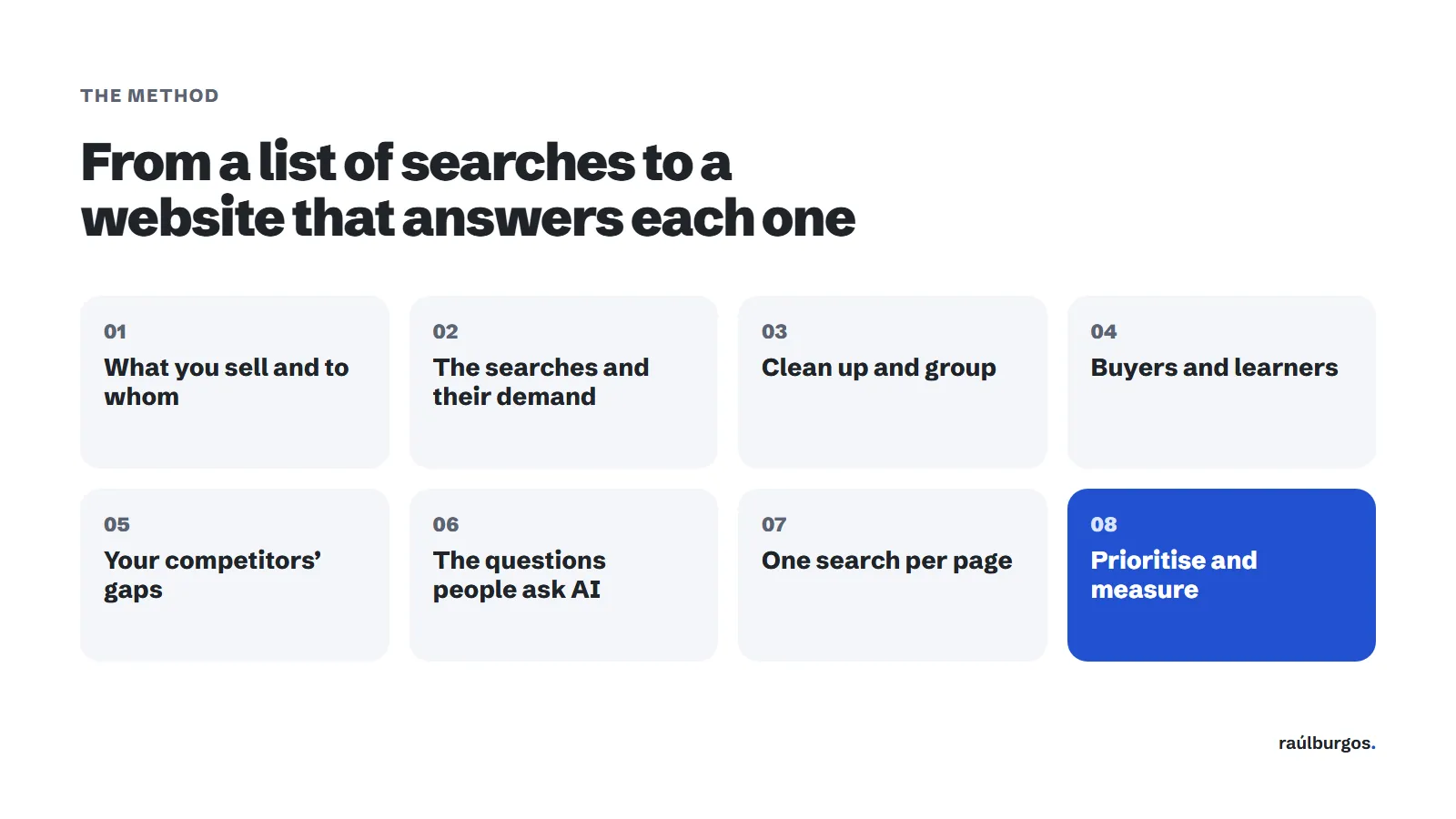
There are 8 steps. The first three find the searches; the next five decide what to do with them. This is the order I do them in.
So you can see how each one works in practice, I use the same example from start to finish: a vet clinic in Málaga that wants more customers from Google.
Step 1: write down what you sell, to whom and where
Before opening any tool, write four lists:
- Your services or products, in your customer’s words, not yours. A customer doesn’t search for “digital presence management”: they search for “show up on Google Maps”.
- The problems you solve: “my website doesn’t show up on Google”, “my traffic dropped when I changed websites”.
- The areas you work in, if your business is local.
- Your customers’ languages, if you have international customers.
These are your seed keywords. Everything else comes from here, so it’s worth spending half an hour on it. If in doubt, look at how your customers ask you for a quote on WhatsApp or by email: their words are right there.
The example: the vet clinic. Its four lists would look like this:
- Services, in the customer’s words: “vet”, “dog vaccinations”, “spay my cat”, “exotic vet”, “emergency vet”. Nobody searches for “feline preventive medicine”.
- Problems it solves: “my dog is vomiting”, “my cat won’t eat”, “ticks on my dog”.
- Areas: Málaga and the clinic’s neighbourhood plus the ones around it. If it’s in Teatinos, for example, Puerto de la Torre too.
- Languages: English and Spanish, because many foreign residents with pets live in Málaga.
Step 2: find the searches and their real demand
Put your seed keywords into Google Ads Keyword Planner, under “Discover new keywords”, with the country and language of your market. It will return hundreds of related searches with their monthly volume. Download them.
Then add two more sources:
- Search Console (Performance → Queries): the searches Google already shows you for. They’re gold, because Google already considers you for them.
- Google’s suggestions: type your service and look at what the search box suggests, then scroll down to “People also ask”. Searches show up there that tools don’t always pick up.
A word on volume: Keyword Planner gives ranges and rounds numbers. Don’t obsess over whether it’s 480 or 590 searches. What matters is the order of magnitude: if one search has 20 and another 2,000, you know which one carries more weight.
For the vet clinic, I’d put “vet Malaga”, “emergency vet”, “cat spaying” and “exotic vet” into Keyword Planner, with the province of Málaga as the location. If it already has a website, Search Console would show which searches it appears for today. And in Google’s suggestions, typing “24 hour vet” would bring up the variations people in a hurry use; under “People also ask”, questions like “how much does it cost to spay a cat?”.
Step 3: clean up the list and group it by topic
The list from step 2 has a lot of noise. Remove:
- Searches for other people’s brands (a competitor’s name or a tool you don’t sell).
- Searches that have nothing to do with what you do, however much volume they have.
- Duplicates: “seo audit”, “seo audits” and “audit seo” are the same search.
Then group them. The rule is simple: if the same page would answer two searches, they go in the same group. “Local SEO consultant”, “local SEO service” and “local SEO expert” are after the same thing, so they go together. “What is local SEO” is something else: whoever types it wants to learn, not hire.
Each group will end up as a page. That’s why this is the step that organises your website the most.
For the vet clinic, I’d remove other clinics’ names, pet food brands and “vet” in towns it doesn’t cover. Then I’d group them like this:
- “Vet Malaga”, “veterinary clinic Malaga” and “vet near me”: one group.
- “Emergency vet Malaga” and “24 hour vet Malaga”: another.
- “Cat spaying” and “cat neutering”: another.
- “Why is my dog vomiting” goes on its own: the person typing it wants to understand what’s wrong, not book an appointment yet.
Step 4: separate what buyers search for from what learners search for
This is the step people skip most, and the one that costs the most money. A search can have a lot of volume and bring you no customers at all, because whoever makes it doesn’t want to hire anything: they want to learn.
The most reliable way to know is to look at what shows up on Google for that search. If you see guides and articles, Google has understood that people want to learn. If you see service pages, they want to hire.
Here’s a real example I found while preparing this guide, in the Spanish market. For “estudio de palabras clave” (keyword research) you get step-by-step guides from blogs. For “servicio keyword research” (keyword research service) you get agency service pages. Almost the same words, but they call for different pages.
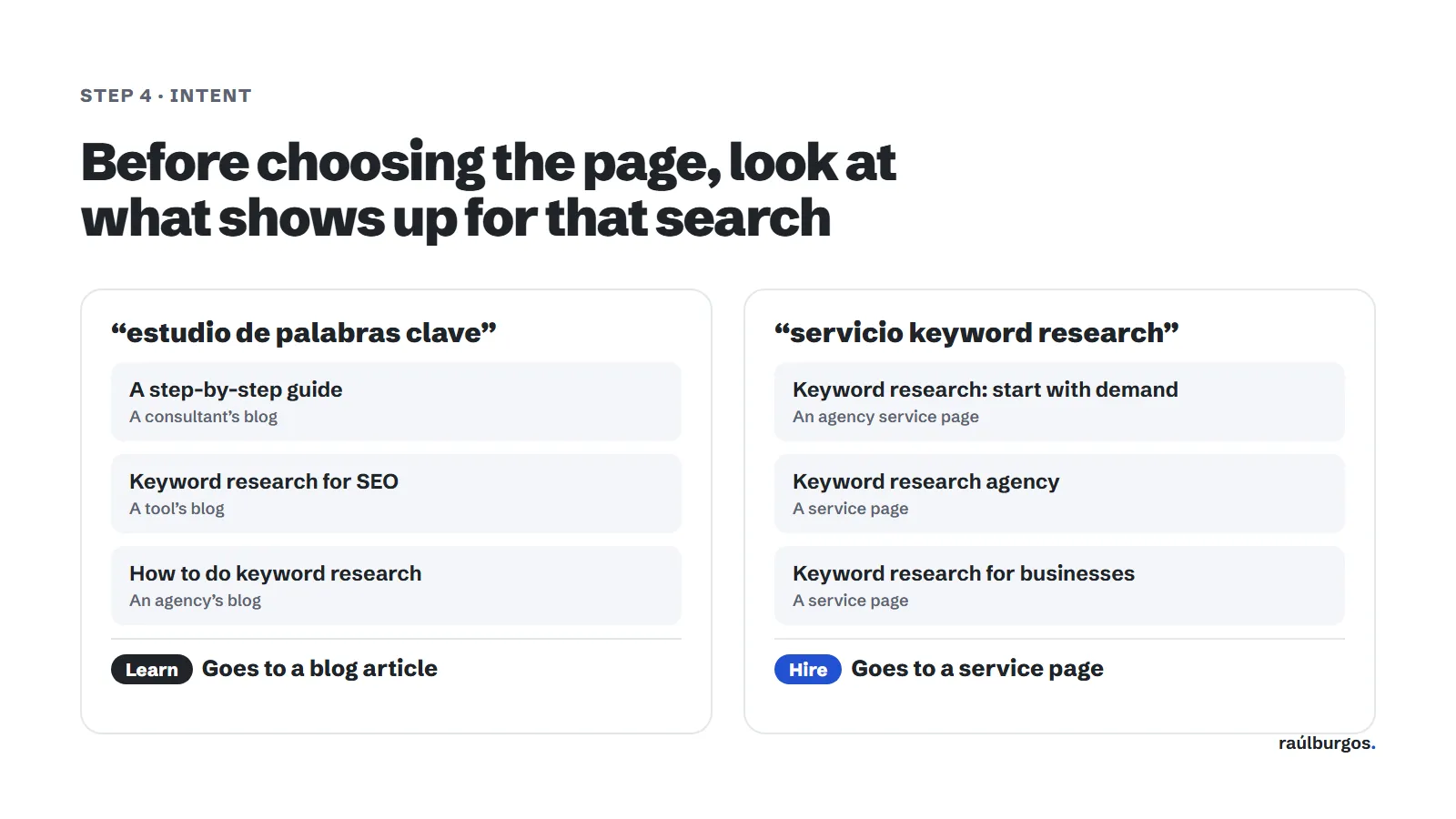
That’s why this guide targets “how to do keyword research”, and my keyword research and site architecture service targets the searches of people who want to hire it. If I had put both on the same page, neither would rank well.
Next to each group, write down its intent:
- Hire: “SEO consultant”, “SEO agency Madrid”, “SEO audit price”.
- Learn: “what is SEO”, “how to do an SEO audit”, “301 redirects”.
- Free: “free SEO audit”, “free website analysis”. Whoever searches this wants to try before paying.
For the vet clinic, the intent would look like this:
- Hire: “vet Malaga”, “emergency vet Malaga”, “cat spaying price Malaga”.
- Learn: “why is my dog vomiting”, “how often should a dog be vaccinated”.
- Free: “free first vet consultation”, only if the clinic offers one.
The learning searches aren’t thrown away: they go to the blog and link to the service. Whoever asks today why their dog is vomiting needs a vet tomorrow.
Step 5: look for the gaps your competitors aren’t working on
This is where ordinary keyword research and keyword research that brings customers part ways. The searches with the most volume are usually taken by whoever has been working them for years. But nobody works every search. There are always some with real demand that your competitors haven’t looked at.
In my experience, those gaps are almost always one of these five kinds:
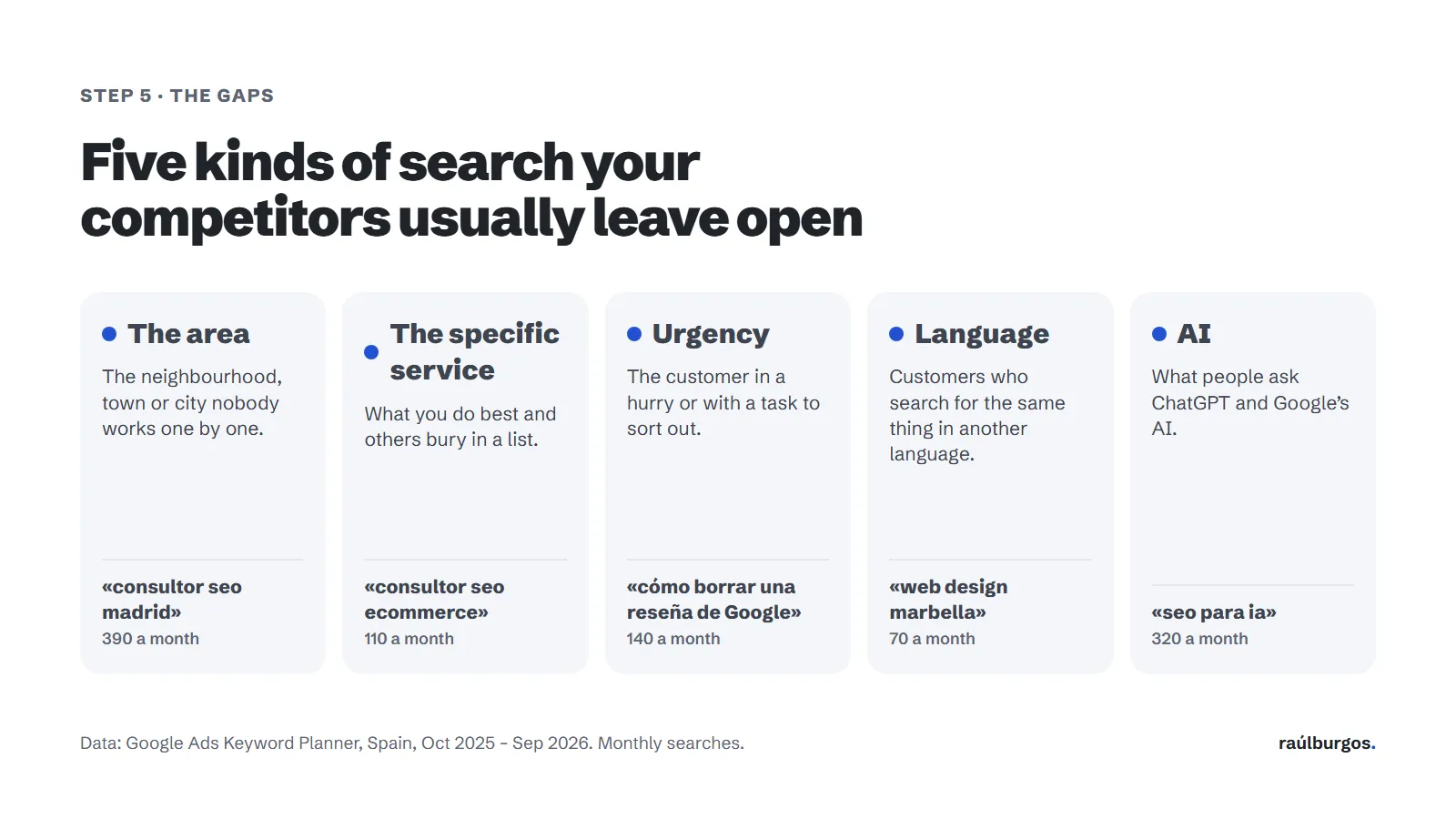
- The area. The neighbourhood, town or city nobody works one by one. “Consultor SEO Madrid” has 390 searches a month in Spain, and many consultants don’t have a page for Madrid.
- The specific service. What you do best and others bury in a list. “Consultor SEO ecommerce” has 110 searches a month: few, but from someone who knows exactly what they want.
- Urgency or a task. The customer in a hurry. “Cómo borrar una reseña de Google” (how to delete a Google review) has 140 searches a month, and whoever types it has a problem right now.
- Language. Customers searching for the same thing in another language. “Web design Marbella” has 70 searches a month in Spain, with almost no competition in English.
- AI. What people ask ChatGPT and Google’s AI. “SEO para IA” (SEO for AI) already has 320 searches a month, and it’s so new that there’s still room.
To know whether a search is a gap, search on Google and see who shows up. There’s a gap when you see any of these signs:
- Directories or portals show up instead of businesses like yours.
- A generic page shows up that covers lots of things, not one dedicated to that search.
- Forums or questions show up without a good answer.
- Your direct competitors don’t show up, or show up with a page that doesn’t answer the search.
If a search shows ten very polished pages from strong companies, note it down for later. It’s not that it can’t be won, it’s that it’s not where to start.
For the vet clinic, the five gaps would look like this:
- The area: “vet Teatinos”. With a page for its neighbourhood it can win that search before “vet Malaga”, where it competes with the whole city.
- The specific service: “exotic vet Malaga”, for rabbits, ferrets or reptiles. Whoever searches for it won’t settle for any clinic.
- Urgency: “24 hour emergency vet Malaga”. Whoever types it calls the first one they see.
- Language: “veterinario Málaga”, from Spanish-speaking customers if the website is only in English, or “English speaking vet Malaga” the other way round.
- AI: “which vet in Málaga would you recommend for a rabbit?”.
Then I’d search each one on Google and look for the signs above. If “exotic vet Malaga” brings up directories and clinics that only mention it in a list, that’s its first gap.
Step 6: add the questions people ask AI
More and more people don’t search on Google: they ask ChatGPT, Gemini or Google’s AI Mode. And they don’t ask in two words, but in full sentences: “which SEO consultant would you recommend for an online shop?”.
Those questions don’t show up in Keyword Planner, so you need another way to find them:
- Think about how your customer would ask a friend about what you sell. Write five or six questions like that.
- Ask them to ChatGPT and to Google in AI Mode, in an incognito window.
- Note down who the AI names and which pages it cites.
If the AI names your competitors and not you, you’ve found a gap. To take it, your website has to answer that question clearly, on a specific page, and other websites in your sector need to mention you. I explain it in more detail on my AI SEO page.
For the vet clinic, I’d ask ChatGPT and Google’s AI mode things like “which vet in Málaga does night-time emergencies?”, “where can I take my rabbit to the vet in Málaga?” or “is there an English speaking vet in Málaga?”. If they name other clinics and not this one, it needs a clear page for each answer (emergencies, exotics and care in English) and to be mentioned by pet websites and local directories.
Step 7: give each page one main search
Now it’s time to turn the groups into pages. This is called website architecture: which pages your website has, how they’re grouped and how they link to each other.
The golden rule is one search, one page. Each group from step 3 gets a page, and each page has one main search and its variants:
- The main search goes in the title, the main heading (H1) and the first sentence of the page.
- The variants go in the subheadings (H2), the paragraphs and the text of internal links.
- The questions go to a frequently asked questions section on that page, or to a blog article that links to it.
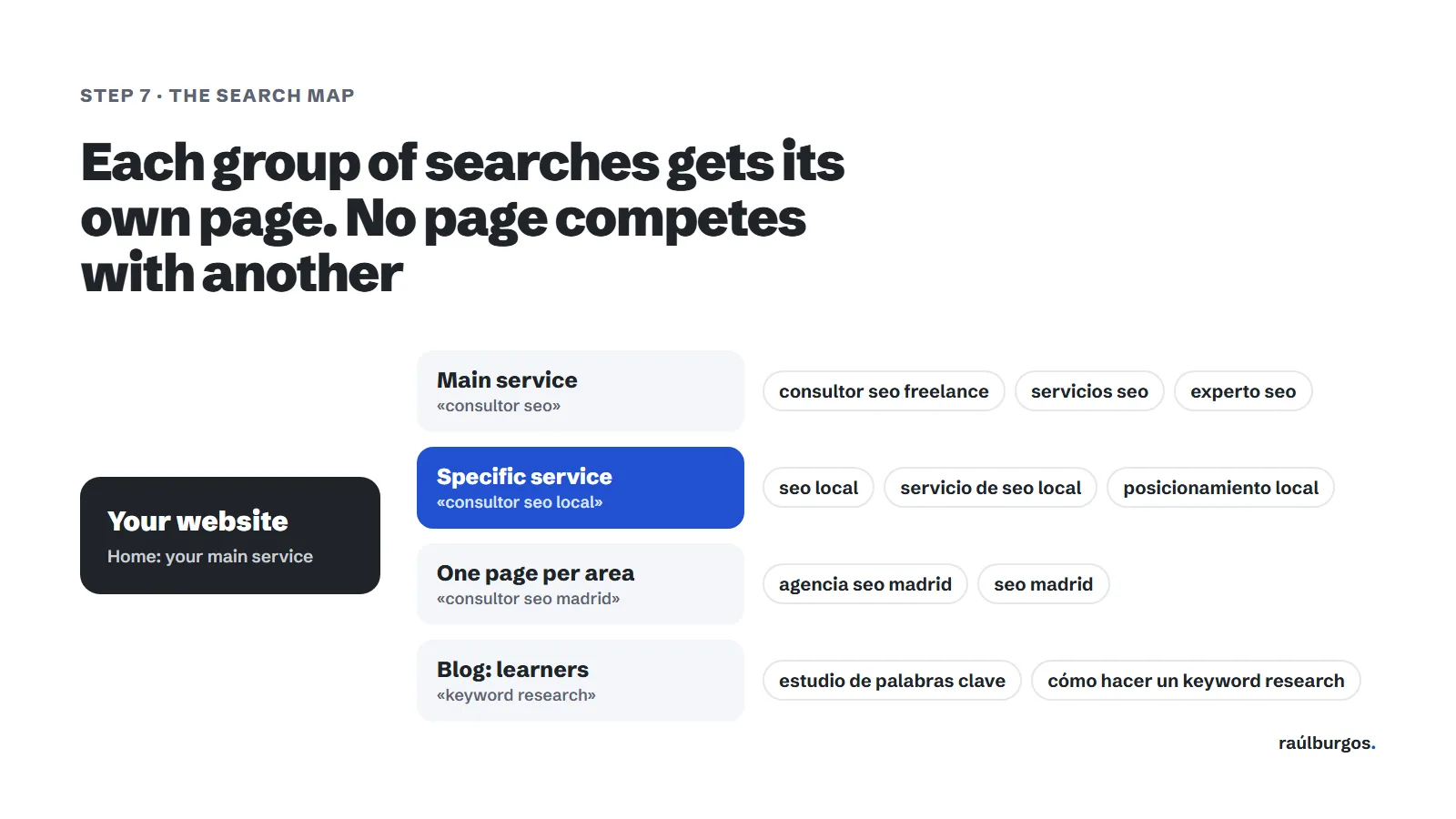
If two pages target the same search, Google doesn’t know which one to show and often shows neither. It’s called keyword cannibalisation and it’s more common than it seems: a blog article that eats the page that sells, or two services that say almost the same thing. Before creating a new page, check your map to make sure that search doesn’t already have an owner.
For the vet clinic, the search map would look like this:
- Home page: “vet Malaga”, with “veterinary clinic Malaga” as a variation.
- Emergencies: “emergency vet Malaga”, with “24 hour vet”.
- Exotics: “exotic vet Malaga”.
- Spaying: “cat spaying Malaga”, with “cat neutering” and the price question in its FAQ.
- Its neighbourhood: “vet Teatinos”.
- In the other language: the Spanish version of the website, with “veterinario Málaga”.
- Blog: “why is my dog vomiting”, with a link to emergencies.
Step 8: prioritise and measure it
With the map finished, order the pages by three criteria:
- Intent: buying searches first, because they’re the ones that bring customers.
- Gap: within those, the ones your competitors aren’t working well.
- Demand: all else being equal, the most searched.
Start with the first three or four. Three well-made pages are better than ten half-done.
And measure it. Every month, in Search Console, check how often each page shows up for its main search and how many clicks it gets. If a page hasn’t moved in three months, check whether it really answers what people are looking for. Keyword research isn’t done once and filed away: it gets reviewed.
For the vet clinic, I’d start with emergencies, exotics and its neighbourhood: they’re hiring searches, competitors probably don’t work them well, and whoever makes them is in a hurry or knows exactly what they want. “Vet Malaga” would come later, because there it competes with the whole city. And every month I’d check in Search Console whether those three pages show up for their search and, above all, whether more calls and appointments come in.
A real example: the keyword research for this website
So this doesn’t stay theoretical, here is the keyword research I did for raulburgos.com, for the Spanish market. The data comes from Google Ads Keyword Planner, for Spain, from October 2025 to September 2026.
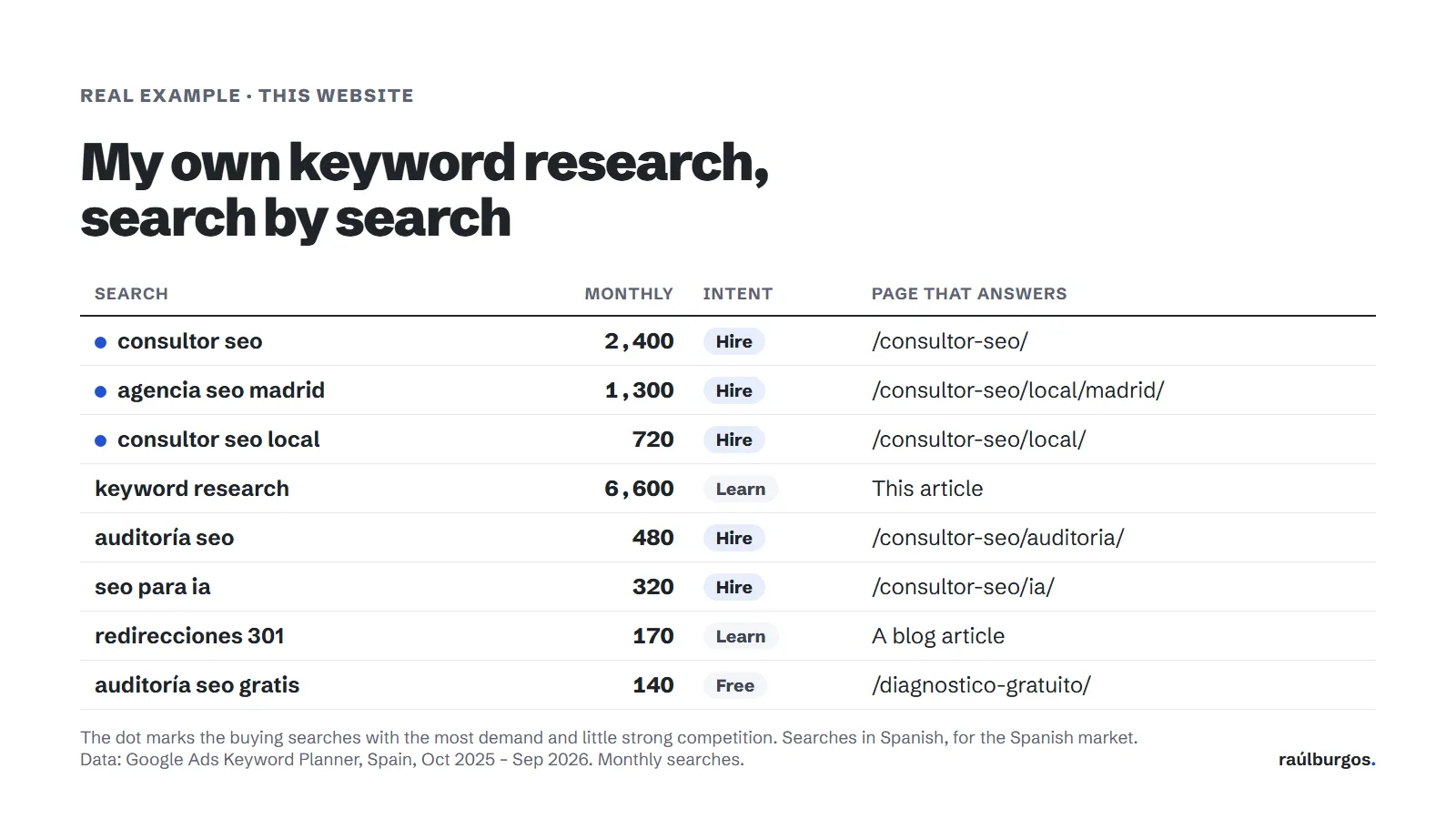
These are some of the decisions I made with that data:
- “Consultor SEO” (SEO consultant, 2,400 a month) is the buying search with the most demand, so it goes to the services page, with “consultor SEO freelance” and “servicios SEO” as variants.
- “Keyword research” (6,600 a month) has almost three times as many searches, but whoever makes it wants to learn. So it doesn’t go to a service page: it goes to this guide.
- “Agencia SEO Madrid” (SEO agency Madrid, 1,300 a month) has more demand than the whole Costa del Sol put together. That figure made me create a page for Madrid.
- “Auditoría SEO gratis” (free SEO audit, 140 a month) is from people who want to try before paying. It goes to the gap map page, not the audit page, so the two don’t compete.
- “Redirecciones 301” (301 redirects, 170 a month) has more searches than “migración SEO” (SEO migration, 70), but it’s a learning search. It goes to the blog and links from there to the migrations service.
What surprised me most was how little some services are searched for by name. “Migración SEO” gets 70 searches a month, fewer than the questions of people about to migrate, such as “redirecciones 301”. That’s why those services lean on blog articles that answer those questions.
Another example: from searches to pages
Keyword research is only useful if it ends in pages. An example from a client: an official car dealership had loads of pages, but none for what buyers were searching for, which was a specific model in a specific city.
The keyword research made the pattern clear: model + city. I created six new pages, one per combination with demand, and removed the ones that added nothing. In three months it went from 5,350 to 7,720 clicks from Google: 44.5% more. You’ll find the full case in car dealership SEO.
Notice that it didn’t take a hundred pages, just six well-chosen ones. That’s the difference between a keyword list and keyword research that gets applied.
Template for your keyword research
Open a spreadsheet with these columns. It’s the same structure I use:
| Column | What you write | Example |
|---|---|---|
| Search | The search as the customer types it | local seo consultant |
| Monthly searches | The volume from Keyword Planner | 720 |
| Group | The topic it belongs to (one page per group) | Local SEO |
| Intent | Hire, learn or free | Hire |
| Gap | What kind of gap it is, if it is one | Specific service |
| Who shows up today | What you see on Google for that search | Directories and a generic page |
| Page | The URL that answers it (new or existing) | /en/local-seo/ |
| Priority | 1, 2 or 3 | 1 |
With this table finished you have your keyword research and your website architecture at the same time.
The mistakes I see most
- Choosing by volume rather than intent. A learning search with 6,000 searches brings fewer customers than a buying search with 300.
- One page for everything. All the services on a single page. Google can’t show it for each one, so it shows it for none.
- Copying your competitors’ keywords. If you do the same as whoever already ranks first, you’re competing on their turf. Look for what they’re not working on.
- Forgetting area and language. They’re two of the easiest gaps to win, and many local businesses don’t work them.
- Not looking at it again. Searches change, especially now with AI. Review your keyword research every six months.
When it’s worth having someone do it for you
If you have a small website and few services, you can do your keyword research with this guide in an afternoon. It’s worth asking for help when:
- You’re going to build or rebuild your website and want to decide properly which pages you need.
- You offer several services or work in several areas and don’t know how to organise them.
- You already have content, but don’t know what brings you customers and what’s surplus.
In those cases I can help with my keyword research and site architecture service. And if you’d like to start without commitment, you can ask for your free gap map: in under 48 hours I’ll send you the searches where you can beat your competitors and where I’d start.
Frequently asked questions
What’s the difference between keyword research and a keyword study?
None. Keyword research, keyword study and keyword analysis are different names for the same thing: finding out what your customer searches for and which page should answer them.
How much does keyword research cost?
Every business has a different problem and a different solution, so I don’t sell fixed packages: the work fits how many services and areas you have. You can start with a free local SEO consultation: in under 48 hours I’ll send you your gap map and, with that, tell you what I’d do.
Can I do keyword research for free?
Yes. With Google Ads Keyword Planner, Search Console, Google in incognito and a spreadsheet you have everything you need. Paid tools save time, but they’re not essential.
How many keywords do I need?
There’s no set number. What you need is one main search per page and its variants. A local business website can work very well with ten or fifteen well-chosen searches.
How often should I redo my keyword research?
Review it every six months, and whenever you’re about to launch a new service, open a new area or rebuild your website. In between, Search Console will tell you which new searches start bringing you visits.